

Masashi Uyama *
* Presently, the author is with Fujitsu Laboratories LTD. His current address is uyama@flab.fujitsu.co.jp.
We think that computer systems should help users find useful
software services and integrate such services into their tasks.
In other words, computer systems should support the entire
innovation-decision process [1] related to software products.
This video demonstrates a computer system that screens and selects
really useful services.
The system provides users with effective clues to
calculate cost-benefit tradeoffs and helps users learn new usage
patterns.
Abstract
Computer systems should help users find useful software services
and integrate such services into their tasks. The three-step
filtering mechanism selects services that trustworthy colleagues have
recommended. It then selects services specific to the context of the
user's task executions. Finally, the mechanism discloses the selected
services to the user dynamically and unobtrusively. This
context-sensitive disclosure allows users to try out new services in
their own task context. The disclosure is unobtrusive since users can
ignore the disclosure and continue with their tasks.
With the task-associated press, users
can reflectively learn such ignored services.
Keywords:
Innovation-decision process, collaborative filtering, context
sensitivity, trialability, intelligent interface, reflective learning.
Introduction
In open network environments, software developers are continually
releasing new software products. These products provide many
services to support users' task executions. But, when and how do
users become aware of the software products? How do they decide
whether the advantages of a new software package justify the time and
effort of learning it? Who provides effective clues from which users
can quickly calculate the cost-benefit tradeoffs?
THREE-STEP FILTERING
Our three-step filtering mechanism [2,3] provides support for a user
as the user moves through the mental process
from first
awareness-knowledge of software services to a decision about
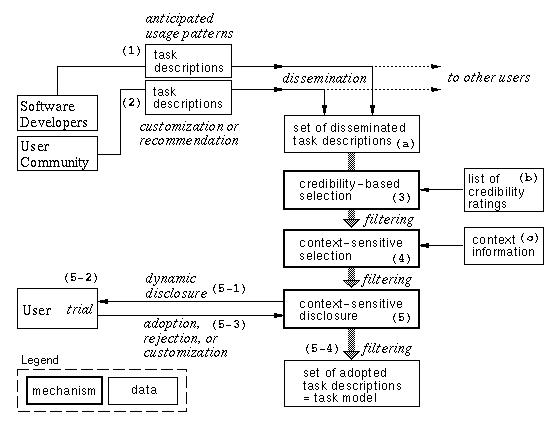
adopting or rejecting them. Figure 1
gives an overview of
the mechanism. Numbers in parentheses shall be referred in this text.
Task descriptions are semi-structured descriptions that prescribe how users can use the available software services. These task descriptions are provided either by software developers or by users. Software developers anticipate how their product will be used, and specify task descriptions on this basis (1). Early adopters of new software can customize developers' task descriptions and disseminate their favorite usage patterns to their colleagues, along with usage recommendations (2). Early adopters acting as volunteer consultants for their colleagues can assign recommendation ratings to the software.
The filtering mechanism filters such disseminated task descriptions(a) in three steps. First, the credibility-based selection (3) filters task descriptions with credibility ratings. These credibility ratings(b) are the degrees to which other users or developers are perceived as trustworthy and knowledgeable. Each user can set credibility ratings for other users or developers, and can thus focus on the type of usage that trustworthy colleagues have recommended.
Second, the context-sensitive selection(4) filters task descriptions with context information. Context information(c) is a representation of the current user's task execution context. By comparing context information and task descriptions that the user has not yet tried out, the context-sensitive selection mechanism can select task descriptions specific to the current task context.
Third, the context-sensitive disclosure(5) dynamically and unobtrusively discloses new software services to the user as specified in the selected task descriptions (5-1). The user tries out these services (5-2), and then decides whether or not to adopt them (5-3). Finally, the adopted task descriptions are added to the current user's task model (5-4).
FIGURE 1. Overview of the filtering mechanism
The main components of the window are the developer's catchphrase(1), a list of colleagues who recommended the usage(2), and a dialog manager icon(3). The user can read comments about the new usage pattern by clicking on the name of the colleague who recommended it. The dialog manager icon provides the user with trialability. By clicking this icon, the user can try out the usage pattern in a real work setting. These three pieces of information allow the user to evaluate the tradeoffs involved in adopting a new usage pattern.
FIGURE 2. What a disclosure window provides
When the user selects an article from the list, the task-associated press reproduces the context that applied to the new usage, and simulates the context. With the task-associated press, users with spare time can learn new features reflectively.